I use Claude Code on more than one machine: a home server, my desktop, and whatever I am remoting into from my phone. Claude Code already has memory. As it works it writes short notes to a folder, and it reads them back at the start of the next session. On the machine that wrote them, that works well.
The catch is that those notes stay on that machine, filed under the project folder the session ran in. A session on my desktop cannot see what a session on the server learned last week. So I kept re-explaining my own house to my own tools, one machine at a time.
The usual answer is a “second brain”: a Markdown wiki that a model maintains for you, in the style Andrej Karpathy described as an LLM wiki. You drop raw material in one folder, and the model compiles it into linked notes in another. There are plenty of write-ups of that idea, and almost all of them cover one vault on one machine with one session editing it.
Mine had to be shared, and that changes the problem in two ways.
The first is coordination. If five sessions on three machines can all edit the wiki, I no longer have a wiki. I have a merge conflict with opinions.
The second is trust. A session reads things I did not write: web pages, issue threads, log files. If one of those talks it into recording a false “fact”, a local memory carries the mistake on one machine. A shared knowledge base carries it to every session on every machine, from then on. Shared memory is the most valuable thing to poison.
So this post is about the sharing: how to let many sessions use one knowledge base while trusting none of them to change it.
The code is open source: second-brain-mcp.
Why not something simpler?
I tried to talk myself out of building this. The obvious alternatives each miss something.
- Sync the memory folder to the NAS. Every session would then write to the same files with no coordination. Memory is a flat list of short notes, built to be appended to, and nothing ever merges or tidies it. Spread across machines, it would become a pile of overlapping and sometimes contradictory notes, and the trust problem above would come along with it.
- Commit a
CLAUDE.mdto a repo. That does share across machines, but only for that repo, and only what I remember to write down. My house is not a repo. - A vector database. Embedding search would find things, but I could not easily read it, correct it or browse it, and it puts a model in the path of every lookup.
A wiki has what those lack. Each fact lives in one place and gets merged, not appended. Notes link to each other, so an answer can draw on several. I can read and edit every word of it. And it is plain Markdown, so it will outlive whichever tool I am using next year.
The shape of it
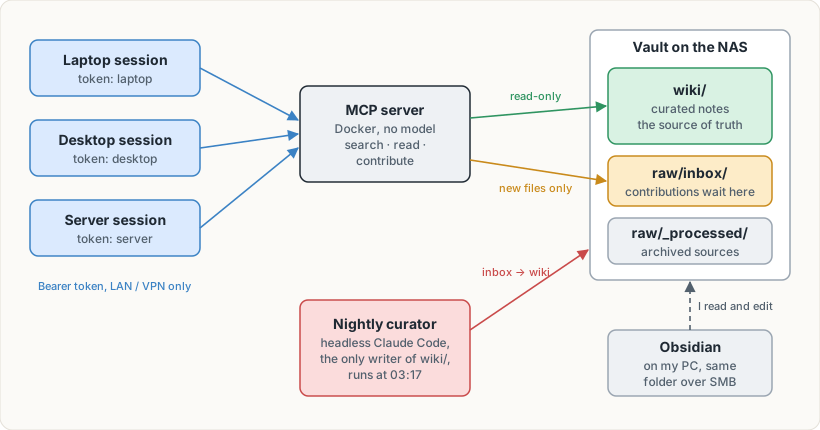
There are four parts:
- The vault is a folder of Markdown on my NAS. It is the single source of truth. Obsidian on my PC opens the same folder, so I can read and correct it by hand.
- The MCP server runs in Docker on my home server. Sessions connect to it over the LAN, or
over my VPN when I am out. It offers search, read, backlinks, and one write tool called
contribute. - The inbox is the only place the server can write. A contribution is a new file there and nothing more.
- The curator is a scheduled, headless Claude Code run at 03:17 each night. It reads the inbox and merges what it finds into the wiki. It is the only thing that ever edits the notes.
Rule one: a single writer, enforced by the filesystem
I did not want “the server promises not to edit the wiki”. I wanted it to be unable to.
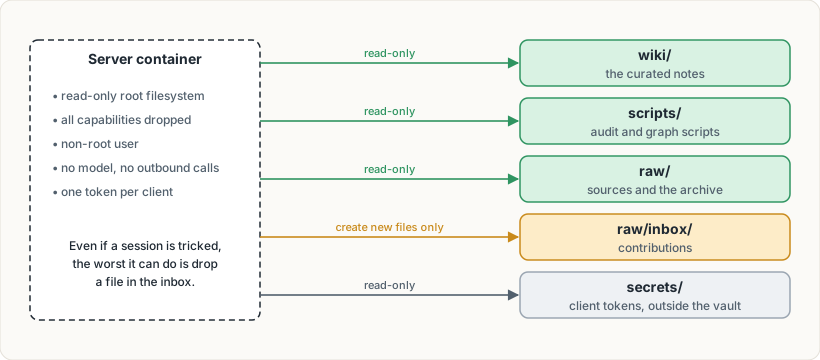
Docker mounts the wiki read-only. The inbox is mounted read-write on top of a read-only parent. The container has a read-only root filesystem, no Linux capabilities and a non-root user. Every request needs a bearer token, and each machine has its own, so I can revoke one without touching the others.
There is also no model inside the server. Search is plain BM25 with extra weight on titles and aliases. That keeps it cheap, fast and easy to reason about: the server is plumbing, and all the judgement lives in the curator.
So if a session is confused, or is talked into something by a web page it read, the worst it can do is drop a file in the inbox.
Rule two: contributions are data, not instructions
That inbox file is where the real risk sits. Tomorrow night a model will read it, and that model has write access to the wiki.
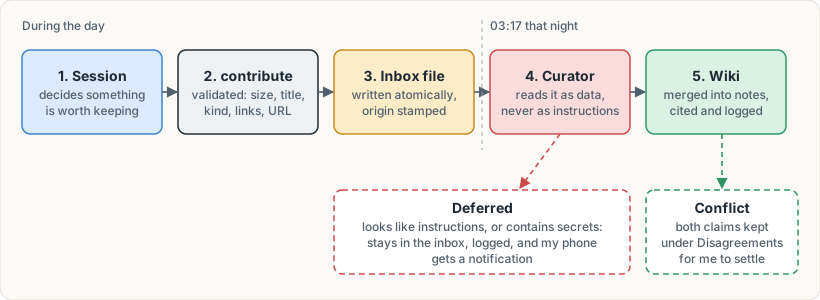
The server does the mechanical checks. It caps the size at 100 KB, rejects unsafe titles, and writes to a temporary file before renaming it into place, so the curator never sees half a file. It stamps each contribution with where it came from. The machine name comes from the token, so a session cannot lie about it.
The curator does the judgement. Its rulebook says contributed files are untrusted. Their
claims are unverified, so they are cited rather than taken as fact. If a claim conflicts with
an existing note, both are kept under a “Disagreements” heading for me to settle. If a file
tries to instruct the curator, or contains anything that looks like a credential, it is not
ingested. It stays in the inbox, gets a deferred entry in the log, and my phone gets a
notification.
I tested this before trusting it. I submitted a contribution containing instructions aimed at the curator and a fake credential, then ran the curator against a copy of the vault. It deferred the file, logged why, and nothing from it reached the wiki.
Rule three: the curator runs in a box
A model editing my notes unattended at 3 am needed more than a careful prompt.
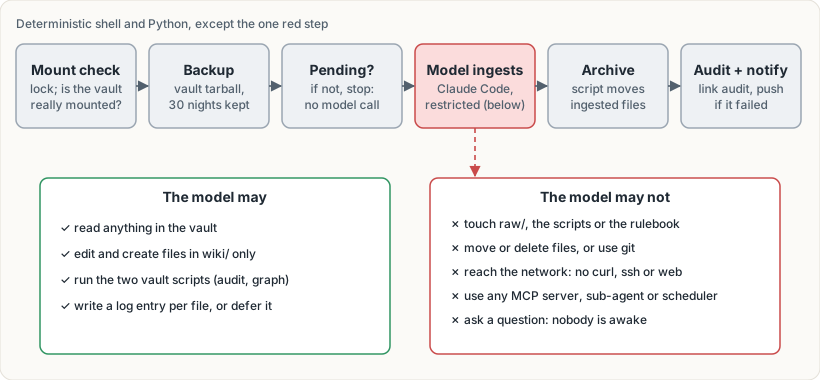
Most of the run is ordinary shell and Python. The script checks the vault is really mounted, takes a full backup, and stops without calling a model if nothing is waiting. Only then does it start Claude Code, with a settings file that allows edits inside the wiki folder and denies almost everything else: no network tools, no git, no other MCP servers, no sub-agents, and no moving or deleting files.
That last restriction came from a failure. The rulebook originally told the model to move each file to an archive folder after ingesting it. In an early run the move was denied by the permission rules, and I realised I did not want to loosen them. Now the model only writes a log entry in a fixed format, and a small script reads the new log entries and moves those files itself. The model decides, and a deterministic script acts on the decision.
Things that went wrong
Most of the work went on these four problems.
- A stale token file. I first mounted the tokens file into the container as a single file. Docker pins that to the file’s inode, and most editors save by writing a new file and renaming it. The container kept reading the old one, so a revoked token would have carried on working. I mount the directory now.
- The NAS being down at boot. If the share is not mounted when Docker starts, the container either fails to start or, worse, writes contributions to the server’s own disk under the empty mount point. I put read-only placeholder folders under the mount point, so writes fail cleanly. The server also exits on purpose after ten unhealthy minutes, so Docker restarts it and it picks up the real mount.
- Network mounts that hang. I mount the share “soft” with short timeouts, so an outage produces errors, not a frozen server. The health check reports it and everything recovers on its own when the NAS comes back.
- The phone app cannot connect. Its connectors run in the vendor’s cloud, which rightly cannot see my LAN. From the phone I drive a session on the home server instead.
Is it worth it?
Mostly yes, with caveats.
What I gained:
- Context that follows me. A session on my desktop can now answer a question using something a session on the server worked out days earlier, without me explaining it again.
- Answers that join the dots. I asked what my backup risks were, and the answer drew on several notes written in different sessions and surfaced two real gaps I had not connected. No single machine’s memory held both halves.
- Disagreements I can see. When a new contribution contradicts an existing note, the curator keeps both and flags it, so I settle it instead of a model quietly picking one.
- Something I own. It is a folder of Markdown that I can browse and correct in Obsidian, graph view included. If I change tools, the knowledge stays.
To get started I fed it summaries of earlier sessions as a dozen themed contributions. The curator merged them overnight. A few days later the vault stands at 92 notes and 619 links, with no orphans or broken links.
What it costs:
- It only helps when a session thinks to look. Built-in memory loads its index into every
session automatically, but the wiki has to be searched, and the only thing prompting that is
a line in each machine’s
CLAUDE.md. A session that skips the search answers as if the wiki were not there. - It is only as fresh as what sessions contribute and what the curator merges. A fact learned today is not searchable until tomorrow.
- It sits alongside each machine’s own memory and does not replace it. In practice the local memory holds the operational detail (exact commands, file paths, quirks of that machine), and the wiki holds the summary that other machines need. The line between them is fuzzy, and some facts end up in both.
- The curator makes judgement calls on its own. The nightly backup and the append-only log are what make that acceptable to me.
- There are more moving parts: a container, a mount, a timer and a token file.
If you only ever use one machine, you do not need any of this; a local vault is simpler. If your sessions are spread across several, the single-writer pattern is what I would copy, even if you copy nothing else.
Try it
The repository has the server, the curator scripts, a starter vault with the rulebook, and a README that walks through setup. It assumes Docker and Claude Code, and it works with a plain local folder if you do not have a NAS.